> ## Documentation Index
> Fetch the complete documentation index at: https://docs.world.org/llms.txt
> Use this file to discover all available pages before exploring further.

# Design Guidelines

## Figma Library

<a href="https://www.figma.com/design/XmNRhspQ3Gfsze5WRjV1PB/ID-Kit-Library?node-id=1-213&t=73AKSDqCV4ZXrGRH-1" target="_blank" rel="noopener noreferrer" className="group flex items-center justify-between p-4 mt-4 mb-6 bg-gradient-to-r from-gray-50 to-gray-100 rounded-xl border border-gray-200 hover:border-gray-300 transition-all hover:shadow-lg no-underline">
  <div className="flex items-center gap-4">
    <div className="w-12 h-12 bg-black rounded-lg flex items-center justify-center">
      <svg width="24" height="24" viewBox="0 0 24 24" fill="none" xmlns="http://www.w3.org/2000/svg">
        <path d="M12 2L2 7L2 17L12 22L22 17V7L12 2Z" stroke="white" strokeWidth="2" strokeLinecap="round" strokeLinejoin="round" />

        <path d="M12 12V22" stroke="white" strokeWidth="2" strokeLinecap="round" strokeLinejoin="round" />

        <path d="M12 12L22 7" stroke="white" strokeWidth="2" strokeLinecap="round" strokeLinejoin="round" />

        <path d="M12 12L2 7" stroke="white" strokeWidth="2" strokeLinecap="round" strokeLinejoin="round" />
      </svg>
    </div>

    <div>
      <h3 className="m-0 text-lg font-semibold text-gray-900">
        IDKit Figma Library
      </h3>

      <p className="m-0 text-sm text-gray-600">
        Access design components and templates for World ID integration
      </p>
    </div>
  </div>

  <svg className="w-5 h-5 text-gray-400 group-hover:text-gray-600 transition-colors" fill="none" viewBox="0 0 20 20">
    <path stroke="currentColor" strokeLinecap="round" strokeLinejoin="round" strokeWidth="1.5" d="M6 10l4 4 4-4" transform="rotate(-90 10 10)" />
  </svg>
</a>

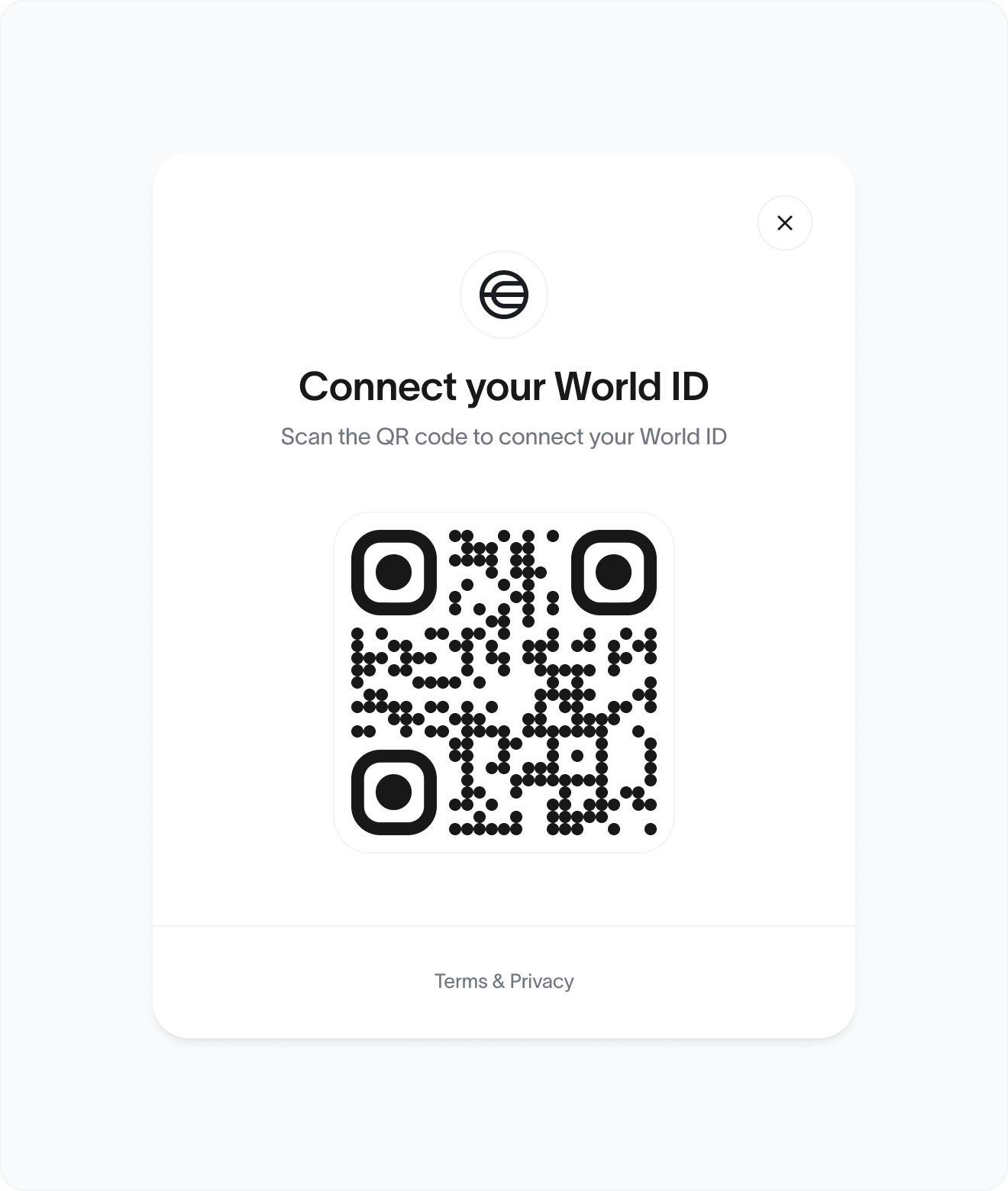
## **Core structure:**

* **World ID logo**
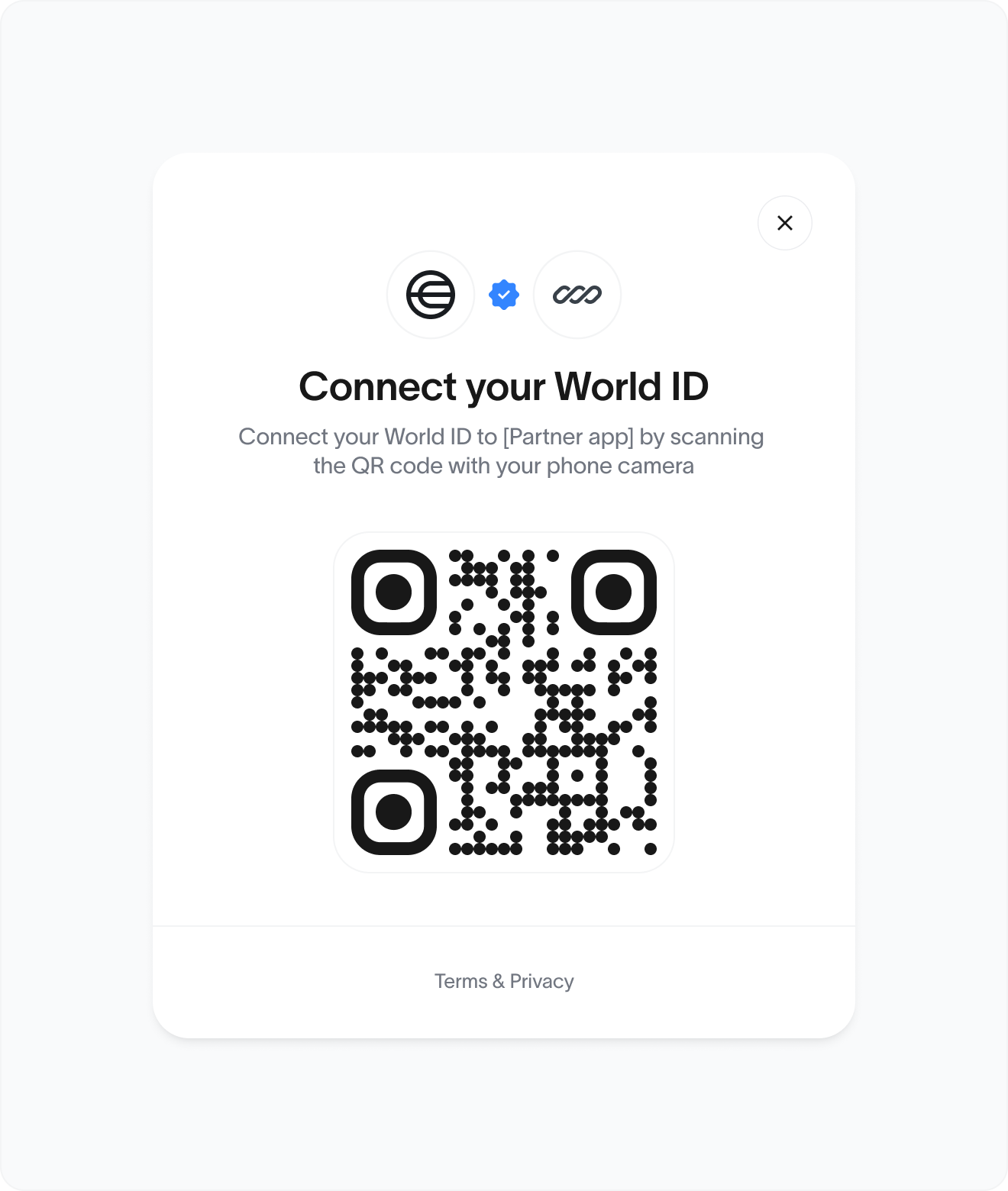
* **Partner logo** (Optional)
* **Title:** "Connect your World ID"
* **Description:** "Scan the QR code to connect your World ID"
* **QR code container** (central and prominent)
* **Footer:** "Terms & Privacy" link
* **Dismiss (X)** icon for closing the modal or window

**Note:** The QR code is dynamically generated and time-limited. Always ensure it's up to date.

## Customization Guidelines

**✅ Partners may:**

* Adjust **typography** to match brand styles, but retain clear hierarchy (title > body)
* Modify **corners or shadows** to match their brand
* Modify **colors**, so long as contrast and accessibility are preserved
* Customize **container shape** (e.g., rounded corners) and **shadow**
* Add a **light/dark mode** toggle or theme-matching behavior
* Localize the **copy if needed** (preferably keeping semantic structure)
* Add their **brand logo** above the title

**❌ Partners must not:**

* Remove or replace the **World ID logo**
* Alter or obscure the **QR code**
* Change the **copy** in a way that misrepresents World ID
* Make the QR code **too small**

## Size & Spacing

<table>
  <thead>
    <tr>
      <th className="p-2 text-left align-middle">Element</th>
      <th className="p-2 text-left align-middle">Recommendation</th>
    </tr>
  </thead>

  <tbody>
    <tr>
      <td className="p-2 align-middle">QR Code</td>
      <td className="p-2 align-middle">Minimum 160 x 160px</td>
    </tr>

    <tr>
      <td className="p-2 align-middle">Padding</td>
      <td className="p-2 align-middle">Min. 24px all sides</td>
    </tr>

    <tr>
      <td className="p-2 align-middle">Logo size</td>
      <td className="p-2 align-middle">32-48px width</td>
    </tr>

    <tr>
      <td className="p-2 align-middle">Font (title)</td>
      <td className="p-2 align-middle">Minimum 16px</td>
    </tr>

    <tr>
      <td className="p-2 align-middle">Font (description)</td>
      <td className="p-2 align-middle">Minimum 14px</td>
    </tr>
  </tbody>
</table>

### **Accessibility checklist:**

* QR code must meet minimum sizing for easy scanning
* All text must meet WCAG AA contrast
* Modal should be **keyboard-navigable** and screen-reader friendly
* "Terms & Privacy" must be a focusable link

### Behavior checklist

* Modal should open centered and dim the background
* Auto-refresh or invalidate QR code after a set time (e.g., 5 mins)
* Optional callback/event on QR scan success
* X button should close the modal gracefully

## States

**Default** Waiting for user to scan the QR code

<img src="https://mintcdn.com/tfh/QgV5KXRTJlR7G1Sc/images/docs/id/design-guidelines/main.png?fit=max&auto=format&n=QgV5KXRTJlR7G1Sc&q=85&s=0562126ca8a98b1018206b73342ef6ee" alt="Default state - Waiting for user to scan the QR code" width="600" height="400" className="w-full h-auto max-w-[600px]" data-path="images/docs/id/design-guidelines/main.png" />

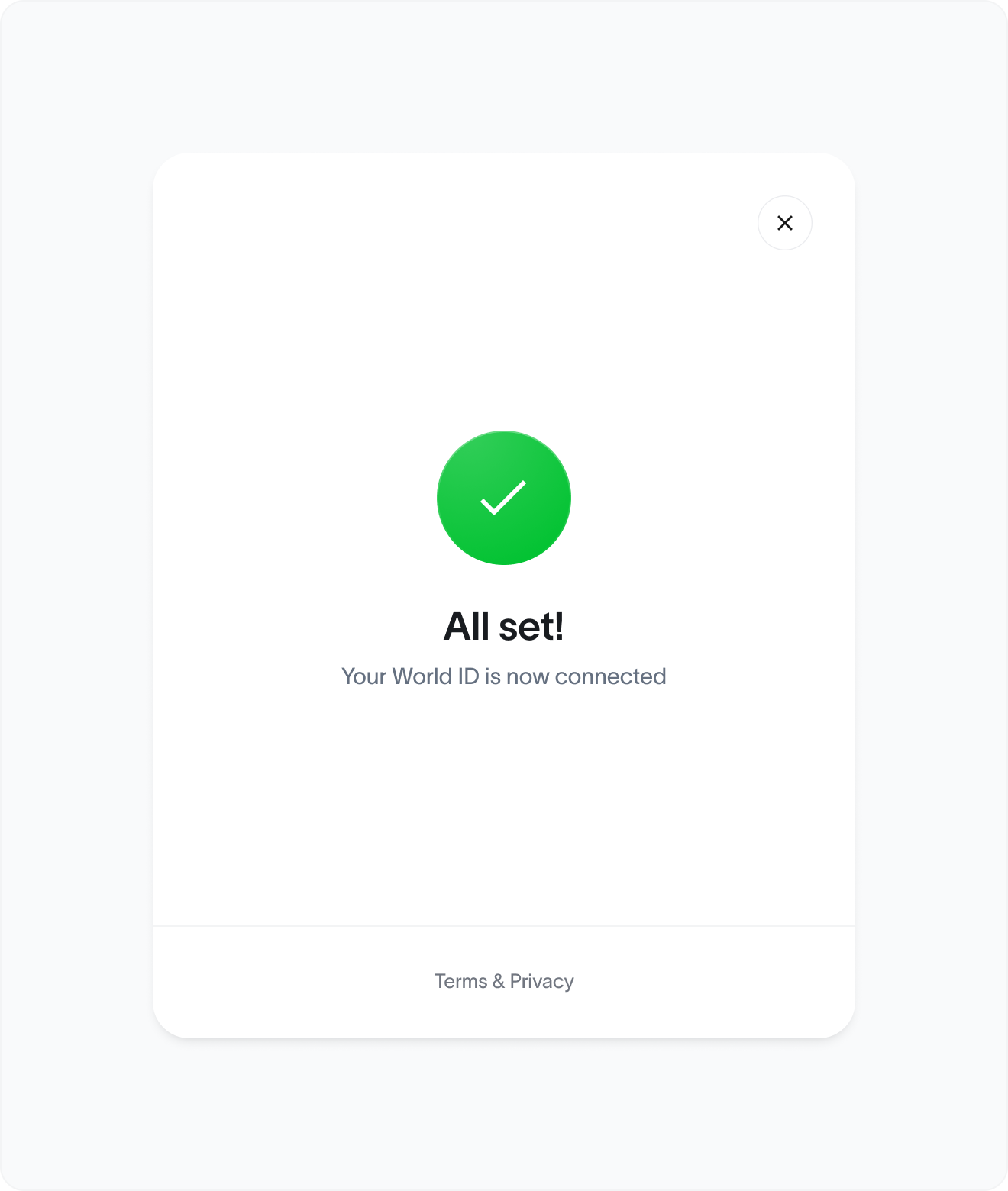
**Success** - Successful connection

<img src="https://mintcdn.com/tfh/QgV5KXRTJlR7G1Sc/images/docs/id/design-guidelines/success.png?fit=max&auto=format&n=QgV5KXRTJlR7G1Sc&q=85&s=b7b6fd9e0e6d1a597aeea8c52d420653" alt="Success - Successful connection" width="600" height="400" className="w-full h-auto max-w-[600px]" data-path="images/docs/id/design-guidelines/success.png" />

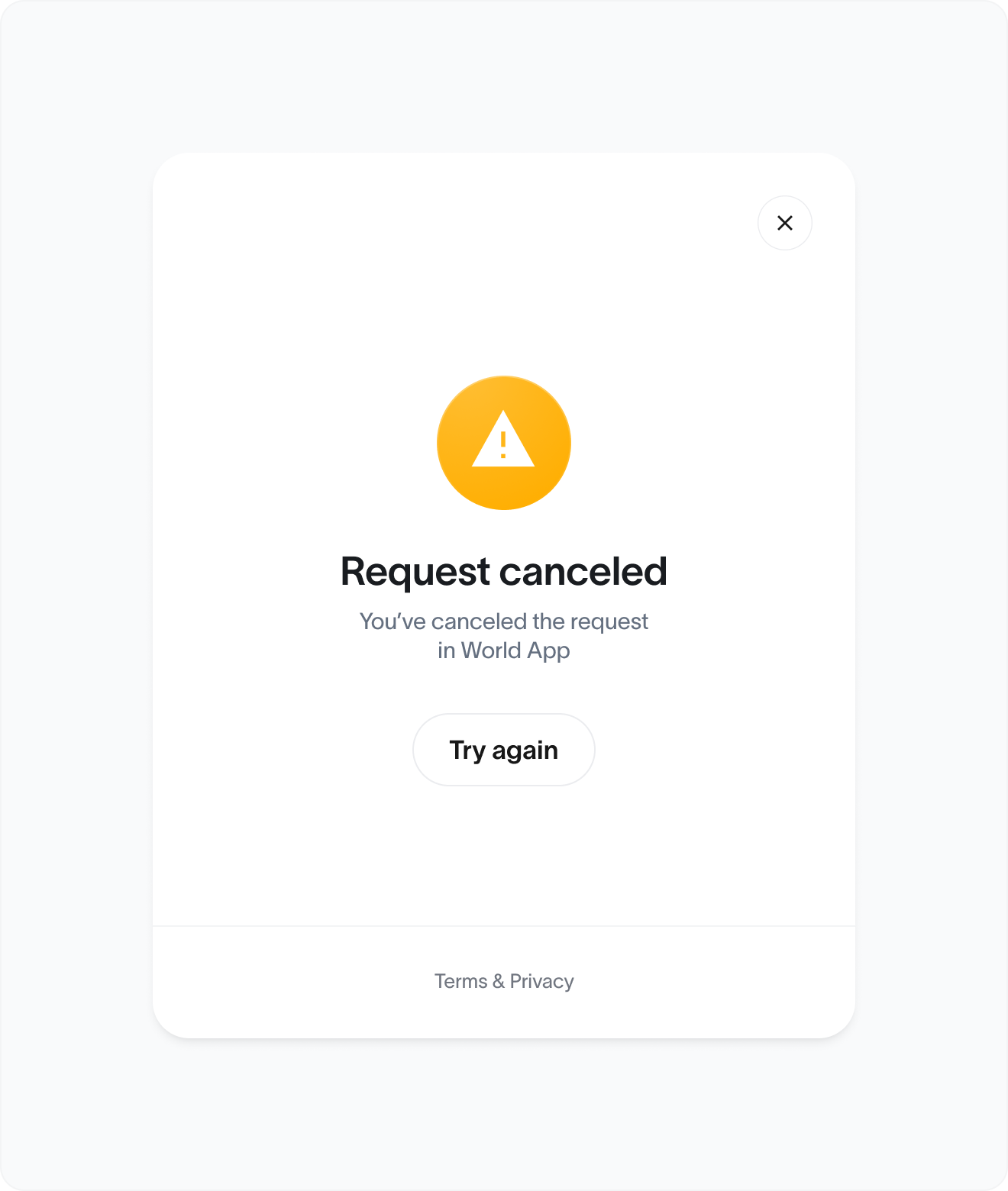
**Request canceled** - User manually canceled request in World App
<img src="https://mintcdn.com/tfh/QgV5KXRTJlR7G1Sc/images/docs/id/design-guidelines/cancel.png?fit=max&auto=format&n=QgV5KXRTJlR7G1Sc&q=85&s=d5dfdacff965cad0dbd776f50baba459" alt="Request canceled - User manually canceled request in World App" width="600" height="400" className="w-full h-auto max-w-[600px]" data-path="images/docs/id/design-guidelines/cancel.png" />

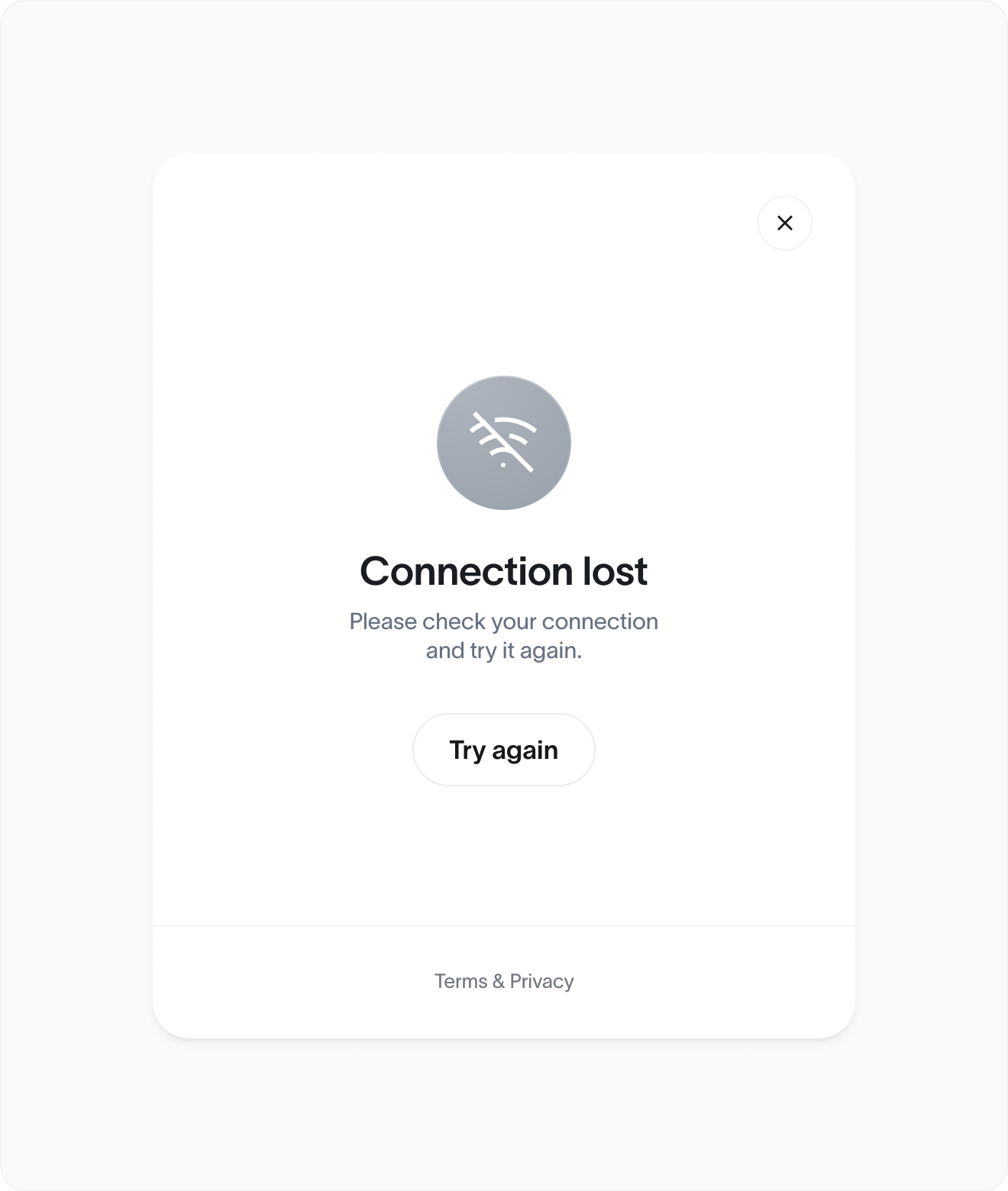
**Connection lost** - Lost connection to server or user offline
<img src="https://mintcdn.com/tfh/QgV5KXRTJlR7G1Sc/images/docs/id/design-guidelines/lost.png?fit=max&auto=format&n=QgV5KXRTJlR7G1Sc&q=85&s=dbf82bb2159dd80c6b62d53e6b0a93a8" alt="Connection lost - Lost connection to server or user offline" width="600" height="400" className="w-full h-auto max-w-[600px]" data-path="images/docs/id/design-guidelines/lost.png" />

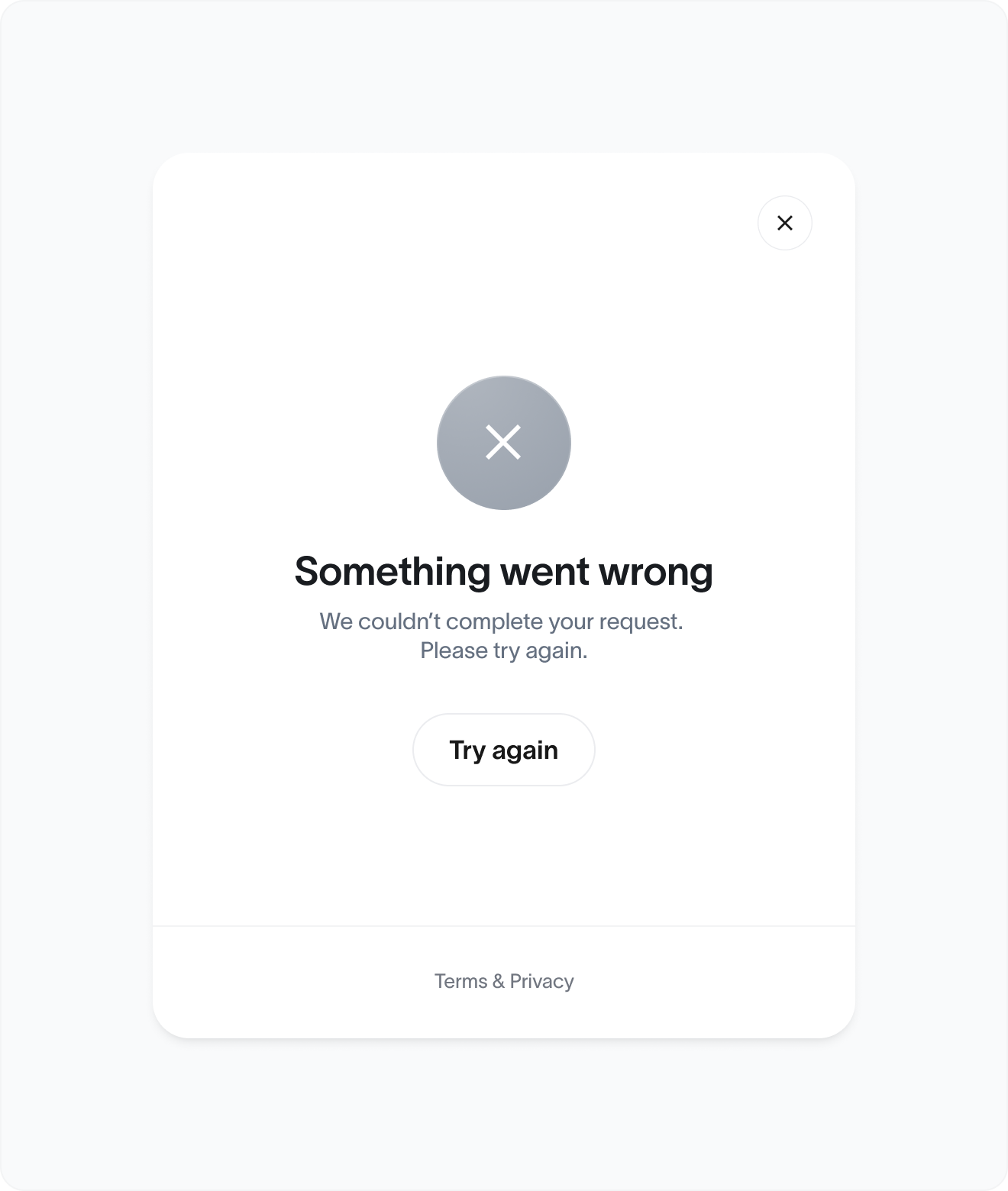
**Error** - Generic technical error or proof failure
<img src="https://mintcdn.com/tfh/QgV5KXRTJlR7G1Sc/images/docs/id/design-guidelines/error.png?fit=max&auto=format&n=QgV5KXRTJlR7G1Sc&q=85&s=33cb5669f1d540d4f6d2dca2a574728d" alt="Error - Generic technical error or proof failure" width="600" height="400" className="w-full h-auto max-w-[600px]" data-path="images/docs/id/design-guidelines/error.png" />

### Partnership example

<img src="https://mintcdn.com/tfh/QgV5KXRTJlR7G1Sc/images/docs/id/design-guidelines/partner.png?fit=max&auto=format&n=QgV5KXRTJlR7G1Sc&q=85&s=1d73918ae9716813f29c79def9feae9f" alt="Partnership example" width="600" height="400" className="w-full h-auto max-w-[600px]" data-path="images/docs/id/design-guidelines/partner.png" />

## Verified Human Badge

The **Human Badge** signals that an account or user has been verified as a unique human via **World ID**. It builds trust, improves authenticity, and can be embedded into products across industries (social, gaming, commerce, identity, etc.).

<a href="https://www.figma.com/design/XmNRhspQ3Gfsze5WRjV1PB/ID-Kit-Library?node-id=1-216" target="_blank" rel="noopener noreferrer" className="group block max-w-sm mt-6 mb-3 mx-auto bg-white rounded-2xl border border-gray-200 hover:border-gray-300 shadow-sm hover:shadow-xl transition-all overflow-hidden no-underline">
  <div className="p-4 bg-gradient-to-br from-gray-50 to-gray-100">
    <img src="https://mintcdn.com/tfh/AMqICHmtFfYZQ_44/images/docs/id/design-guidelines/human-verified-badge.svg?fit=max&auto=format&n=AMqICHmtFfYZQ_44&q=85&s=05c188fa5af24db5b1dea0ae2531b3fb" alt="Human badge" width="24" height="24" className="mx-auto h-12 w-12" data-path="images/docs/id/design-guidelines/human-verified-badge.svg" />
  </div>

  <div className="p-4">
    <h3 className="m-0 text-lg p-0 font-bold text-gray-900 group-hover:text-black transition-colors">
      Human Badge Figma Assets
    </h3>

    <p className="m-0 text-sm text-gray-600">
      Download the human badge asset.
    </p>

    <div className="flex items-center text-sm font-medium text-primary">
      Open in Figma

      <svg className="ml-2 w-4 h-4 group-hover:translate-x-1 transition-transform" fill="none" viewBox="0 0 20 20">
        <path stroke="currentColor" strokeLinecap="round" strokeLinejoin="round" strokeWidth="2" d="M3 10h14m-4-4l4 4-4 4" />
      </svg>
    </div>
  </div>
</a>

***

## Badge design

* Symbol: World icon
* Label: human in lowercase, optionally styled in pill or badge form

### **Variants:**

* **Icon-only:** For dense UI like leaderboards or tooltips
* **Icon + label:** Preferred for public profiles, social posts, and player cards

### Do:

* Keep badge **small, clear, unobtrusive**
* Always pair with or near a user identity (e.g. username, avatar)
* Use consistent shape and padding

### Don't:

* Overstyle or animate
* Replace or remix copy ("real human", "verified user", etc.)
* Add misleading hierarchy (e.g. badge > blue check)

***

## Placement guidelines

<table>
  <thead>
    <tr>
      <th className="p-2 text-left align-middle">Content</th>
      <th className="p-2 text-left align-middle">Placement</th>
      <th className="p-2 text-left align-middle">Format</th>
    </tr>
  </thead>

  <tbody>
    <tr>
      <td className="p-2 align-middle">Social profiles</td>
      <td className="p-2 align-middle">Below or beside username / bio</td>
      <td className="p-2 align-middle">Icon + label</td>
    </tr>

    <tr>
      <td className="p-2 align-middle">Gaming profiles</td>
      <td className="p-2 align-middle">Under character name or stats</td>
      <td className="p-2 align-middle">Icon + label</td>
    </tr>

    <tr>
      <td className="p-2 align-middle">Leaderboards</td>
      <td className="p-2 align-middle">Right of username</td>
      <td className="p-2 align-middle">Icon + label</td>
    </tr>

    <tr>
      <td className="p-2 align-middle">Messaging/chat</td>
      <td className="p-2 align-middle">Right of username</td>
      <td className="p-2 align-middle">Icon + label</td>
    </tr>

    <tr>
      <td className="p-2 align-middle">Account dashboards</td>

      <td className="p-2 align-middle">
        Near user ID, next to login method, etc.
      </td>

      <td className="p-2 align-middle">Icon + label</td>
    </tr>
  </tbody>
</table>

## Theming & Branding

**✅ Partners may:**

* Adapt badge color to suit **light/dark mode**

**❌ Partners must not:**

* Remove or replace the word human
* Make it look like a World ID badge gives higher permissions than intended
* Change the logo shape

## Rules checklist

### **Layout and Visual**

* Correct badge asset used
* Logo is not distorted, recolored or modified
* Minimum height is respected

### Placement

* Placed directly next to or below user, display name, or avatar
* Badge is not visually grouped with unrelated badges
* Badge does not imply special privileges unless defined