> ## Documentation Index
> Fetch the complete documentation index at: https://docs.world.org/llms.txt
> Use this file to discover all available pages before exploring further.
# Deploy Smart Contracts
> Deploy a HelloWorldChain smart contract to World Chain Sepolia using Foundry: setup, build, test, fund, and create.
In this tutorial, we will use the [Solidity programming language](https://docs.soliditylang.org/en/v0.8.28/) to write the `HelloWorldChain` smart contract for World Chain.
Solidity is a programming language that can compile to EVM (Ethereum Virtual Machine) bytecode which can be executed on the World Chain EVM.
We will also be using the [Foundry CLI](https://book.getfoundry.sh/) toolkit, which has a lot of tools to help build, test and interact with Solidity programs.
## Download development tools
First, we need to install the Foundry CLI toolkit and the Solidity compiler. Solidity comes with a compiler called `solc` which we will use to compile the `HelloWorldChain` contract. The Foundry CLI
will automatically download the right version of the Solidity compiler for you during the compilation process using `forge build`.
```bash Install Foundry theme={null}
curl -L https://foundry.paradigm.xyz | bash
```
## Create a Foundry project
Open your terminal of choice, navigate to a directory where you want to create your project, and run the following command to create a new Foundry project:
```bash Create a new Foundry project theme={null}
forge init hello-world-chain && cd hello-world-chain
```
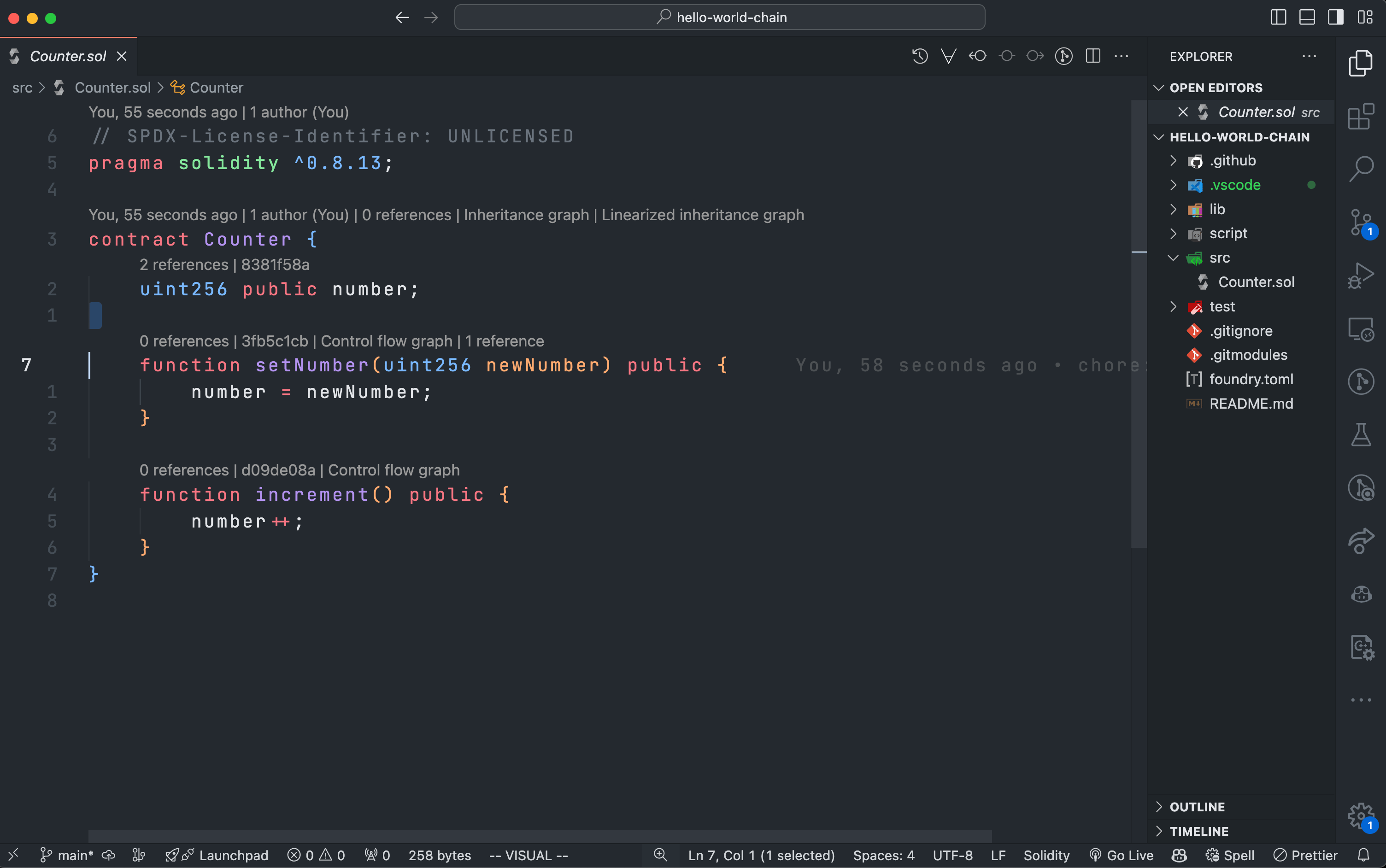
Now that you have created a new Foundry project, you can start writing your smart contract. All smart contracts in Foundry projects are stored in the `src` directory.
If you are using VSCode, it should look something like this:
 ## Write the HelloWorldChain contract
First, delete the template `src/Counter.sol` file:
```bash Delete Template theme={null}
rm src/Counter.sol
```
Next, create a new `src/HelloWorldChain.sol` file and add the following code to it:
```solidity HelloWorldChain.sol theme={null}
// SPDX-License-Identifier: MIT
pragma solidity ^0.8.28;
contract HelloWorldChain {
string private word;
// Constructor that sets the initial word to "Hello World Chain!"
constructor() {
word = "Hello World Chain!";
}
// Setter function to update the word
function setWord(string memory newWord) public {
word = newWord;
}
// Getter function to return the current word
function getWord() public view returns (string memory) {
return word;
}
}
```
This contract has a `word` variable that stores a string and two functions: `setWord` to update the word and `getWord` to return the current word.
## Update Scripts and Tests
Since we deleted `Counter.sol`, we need to update or remove the scripts and tests that reference it to prevent compilation errors.
### Delete the `script/` directory
The script directory contains scripts that import `Counter.sol`. Since we no longer have `Counter.sol`, we can delete the entire script directory to avoid any compilation issues:
```bash Delete Script Directory theme={null}
rm -rf script
```
### Replace `Counter.t.sol` with `HelloWorldChain.t.sol`
In the test directory, delete the existing `Counter.t.sol` and create a new test file called `HelloWorldChain.t.sol` and add the following simple tests:
```solidity HelloWorldChain.t.sol theme={null}
// SPDX-License-Identifier: MIT
pragma solidity ^0.8.28;
import { Test } from "forge-std/Test.sol";
import { HelloWorldChain } from "../src/HelloWorldChain.sol";
contract HelloWorldChainTest is Test {
HelloWorldChain helloWorldChain;
function setUp() public {
helloWorldChain = new HelloWorldChain();
}
function testInitialWord() public view {
string memory expected = "Hello World Chain!";
string memory actual = helloWorldChain.getWord();
assertEq(actual, expected);
}
function testSetWord() public {
string memory newWord = "Hello Foundry!";
helloWorldChain.setWord(newWord);
string memory actual = helloWorldChain.getWord();
assertEq(actual, newWord);
}
}
```
Now you can run tests:
```bash Test the contract theme={null}
forge test
```
## Compile the contract
To compile the `HelloWorldChain` contract, run the following command:
```bash Compile the contract theme={null}
forge build
```
The `forge build` command will compile the contract using the Solidity compiler and generate the necessary artifacts in the `out` directory.
## Generate a wallet
To deploy the `HelloWorldChain` contract to World Chain Sepolia, you will need a wallet with some World Chain Sepolia ETH. An easy way to generate a
wallet using the Foundry CLI is to run the following command:
```bash Generate a wallet theme={null}
cast wallet new
```
`cast` is a versatile set of utility functions and commands for Solidity development. In this case, we are using one of its many built-in features to generate a wallet with one account.
Never share your private key with anyone and always make sure that you don't
upload them to code versioning tools like Git and hosting platforms like
GitHub. Research best practices for private key management in order to avoid
loss of funds.
The output of the command will look something like this:
```bash Wallet output theme={null}
Successfully created new keypair.
Address: 0xB815A0c4bC23930119324d4359dB65e27A846A2d
Private key: 0xcc1b30a6af68ea9a9917f1dda20c927704c5cdb2bbe0076901a8a0e40bf997c5
```
## Fund your wallet
Now that you have a wallet, you need to fund it with some World Chain Sepolia ETH. You can get some World Chain Sepolia ETH from the [World Chain Sepolia faucet](https://www.alchemy.com/faucets/world-chain-sepolia) operated by Alchemy.
In the form on the faucet page, enter the address of your wallet which you generated above and click the "Send me ETH" button. If you have any issues please send us a message in the developer
group chat on [Telegram](https://t.me/worlddevelopersupport) or [Discord](https://world.org/discord).
## Deploy the contract
Now that you have a wallet and you funded it with World Chain Sepolia ETH, you can deploy the `HelloWorldChain` contract to World Chain Sepolia using the following `forge create` command:
```bash Deploy the contract theme={null}
forge create src/HelloWorldChain.sol:HelloWorldChain \
--rpc-url https://worldchain-sepolia.g.alchemy.com/public \
--private-key 0xcc1b30a6af68ea9a9917f1dda20c927704c5cdb2bbe0076901a8a0e40bf997c5
```
Here, we are using the `:` format to specify the contract. This tells Foundry where to find the contract file (`src/HelloWorldChain.sol`) and which contract within the file (HelloWorldChain) to deploy.
We also use the `--rpc-url` flag to specify the RPC URL of the World Chain Sepolia network and the `--private-key` flag to specify the private key of the wallet we generated earlier.
On top of this we can also provide other flags like `-vvvvv` to get more verbose output from the deployment process, `--verify` to verify the contract on [Worldscan](https://worldscan.org) or [Blockscout](https://worldchain-sepolia.explorer.alchemy.com/) (alongside with an `--etherscan-api-key` flag) and
several other flags to toggle different features that you can find more about in the [Foundry documentation](https://book.getfoundry.sh/).
And that's it! You have successfully deployed a smart contract to World Chain Sepolia. You can interact with the contract using `forge script` scripts, using a block explorer or any other EVM library like [ethers.js](https://docs.ethers.io/v5/), [alloy-rs](https://github.com/alloy-rs/alloy/), and many others.
## Write the HelloWorldChain contract
First, delete the template `src/Counter.sol` file:
```bash Delete Template theme={null}
rm src/Counter.sol
```
Next, create a new `src/HelloWorldChain.sol` file and add the following code to it:
```solidity HelloWorldChain.sol theme={null}
// SPDX-License-Identifier: MIT
pragma solidity ^0.8.28;
contract HelloWorldChain {
string private word;
// Constructor that sets the initial word to "Hello World Chain!"
constructor() {
word = "Hello World Chain!";
}
// Setter function to update the word
function setWord(string memory newWord) public {
word = newWord;
}
// Getter function to return the current word
function getWord() public view returns (string memory) {
return word;
}
}
```
This contract has a `word` variable that stores a string and two functions: `setWord` to update the word and `getWord` to return the current word.
## Update Scripts and Tests
Since we deleted `Counter.sol`, we need to update or remove the scripts and tests that reference it to prevent compilation errors.
### Delete the `script/` directory
The script directory contains scripts that import `Counter.sol`. Since we no longer have `Counter.sol`, we can delete the entire script directory to avoid any compilation issues:
```bash Delete Script Directory theme={null}
rm -rf script
```
### Replace `Counter.t.sol` with `HelloWorldChain.t.sol`
In the test directory, delete the existing `Counter.t.sol` and create a new test file called `HelloWorldChain.t.sol` and add the following simple tests:
```solidity HelloWorldChain.t.sol theme={null}
// SPDX-License-Identifier: MIT
pragma solidity ^0.8.28;
import { Test } from "forge-std/Test.sol";
import { HelloWorldChain } from "../src/HelloWorldChain.sol";
contract HelloWorldChainTest is Test {
HelloWorldChain helloWorldChain;
function setUp() public {
helloWorldChain = new HelloWorldChain();
}
function testInitialWord() public view {
string memory expected = "Hello World Chain!";
string memory actual = helloWorldChain.getWord();
assertEq(actual, expected);
}
function testSetWord() public {
string memory newWord = "Hello Foundry!";
helloWorldChain.setWord(newWord);
string memory actual = helloWorldChain.getWord();
assertEq(actual, newWord);
}
}
```
Now you can run tests:
```bash Test the contract theme={null}
forge test
```
## Compile the contract
To compile the `HelloWorldChain` contract, run the following command:
```bash Compile the contract theme={null}
forge build
```
The `forge build` command will compile the contract using the Solidity compiler and generate the necessary artifacts in the `out` directory.
## Generate a wallet
To deploy the `HelloWorldChain` contract to World Chain Sepolia, you will need a wallet with some World Chain Sepolia ETH. An easy way to generate a
wallet using the Foundry CLI is to run the following command:
```bash Generate a wallet theme={null}
cast wallet new
```
`cast` is a versatile set of utility functions and commands for Solidity development. In this case, we are using one of its many built-in features to generate a wallet with one account.
Never share your private key with anyone and always make sure that you don't
upload them to code versioning tools like Git and hosting platforms like
GitHub. Research best practices for private key management in order to avoid
loss of funds.
The output of the command will look something like this:
```bash Wallet output theme={null}
Successfully created new keypair.
Address: 0xB815A0c4bC23930119324d4359dB65e27A846A2d
Private key: 0xcc1b30a6af68ea9a9917f1dda20c927704c5cdb2bbe0076901a8a0e40bf997c5
```
## Fund your wallet
Now that you have a wallet, you need to fund it with some World Chain Sepolia ETH. You can get some World Chain Sepolia ETH from the [World Chain Sepolia faucet](https://www.alchemy.com/faucets/world-chain-sepolia) operated by Alchemy.
In the form on the faucet page, enter the address of your wallet which you generated above and click the "Send me ETH" button. If you have any issues please send us a message in the developer
group chat on [Telegram](https://t.me/worlddevelopersupport) or [Discord](https://world.org/discord).
## Deploy the contract
Now that you have a wallet and you funded it with World Chain Sepolia ETH, you can deploy the `HelloWorldChain` contract to World Chain Sepolia using the following `forge create` command:
```bash Deploy the contract theme={null}
forge create src/HelloWorldChain.sol:HelloWorldChain \
--rpc-url https://worldchain-sepolia.g.alchemy.com/public \
--private-key 0xcc1b30a6af68ea9a9917f1dda20c927704c5cdb2bbe0076901a8a0e40bf997c5
```
Here, we are using the `:` format to specify the contract. This tells Foundry where to find the contract file (`src/HelloWorldChain.sol`) and which contract within the file (HelloWorldChain) to deploy.
We also use the `--rpc-url` flag to specify the RPC URL of the World Chain Sepolia network and the `--private-key` flag to specify the private key of the wallet we generated earlier.
On top of this we can also provide other flags like `-vvvvv` to get more verbose output from the deployment process, `--verify` to verify the contract on [Worldscan](https://worldscan.org) or [Blockscout](https://worldchain-sepolia.explorer.alchemy.com/) (alongside with an `--etherscan-api-key` flag) and
several other flags to toggle different features that you can find more about in the [Foundry documentation](https://book.getfoundry.sh/).
And that's it! You have successfully deployed a smart contract to World Chain Sepolia. You can interact with the contract using `forge script` scripts, using a block explorer or any other EVM library like [ethers.js](https://docs.ethers.io/v5/), [alloy-rs](https://github.com/alloy-rs/alloy/), and many others.