> ## Documentation Index
> Fetch the complete documentation index at: https://docs.world.org/llms.txt
> Use this file to discover all available pages before exploring further.

# Getting Started

> Create a Mini App with the official template or install MiniKit-JS manually.

[MiniKit-JS](https://github.com/worldcoin/minikit-js) is our official SDK for creating mini apps that work with World App.

## Quick Start

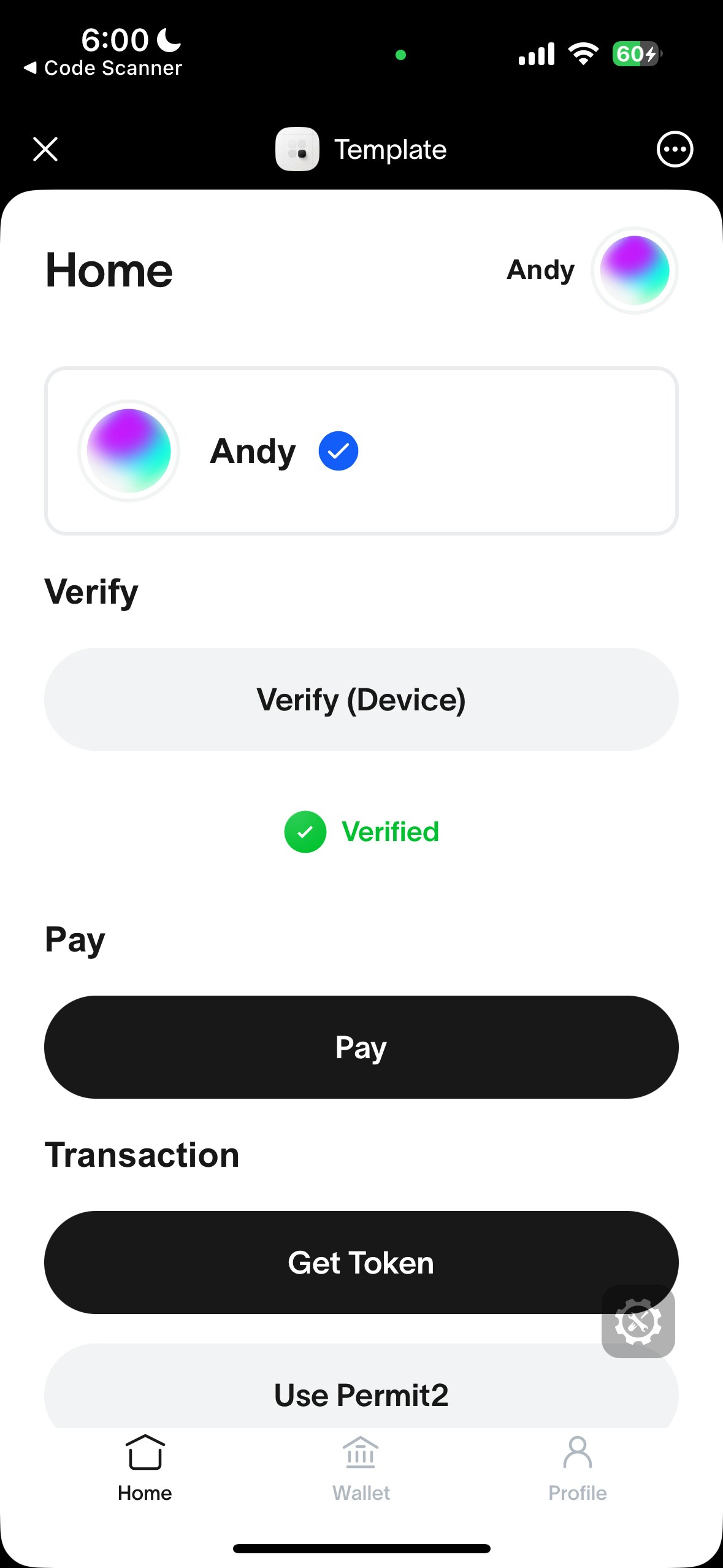
The fastest way to get started is by using our template next-15 repository.
Run the following command and follow the instructions to create a new mini app. For cleanliness we recommend using `pnpm` as your package manager.

```bash theme={null}
npx @worldcoin/create-mini-app@latest my-first-mini-app
```

<div style={{ display: "flex", flexDirection: "column", alignItems: "center" }}>
  <img
    src="https://mintcdn.com/tfh/vNgKkjbn9HQ46Vw7/images/docs/mini-apps/quick-start/template.png?fit=max&auto=format&n=vNgKkjbn9HQ46Vw7&q=85&s=e070c2e012dc9f13aaa1b619e64c1213"
    alt="Template"
    className="m-auto block img-miniapps-template"
    width="220"
    style={{
  borderRadius: "12px",
  boxShadow: "0 2px 10px rgba(0,0,0,0.06)",
}}
    data-path="images/docs/mini-apps/quick-start/template.png"
  />

  <p style={{ fontStyle: "italic", marginTop: "0.5rem" }}>
    Correctly running template should look like this
  </p>
</div>

## Manual Installation

[MiniKit-JS](https://www.npmjs.com/package/@worldcoin/minikit-js) is the core library and is framework agnostic. Install it with `pnpm`, or use a CDN like [jsdelivr](https://www.jsdelivr.com/package/npm/@worldcoin/minikit-js) for inline HTML. Replace `[version]` with the release you want to load.

<CodeGroup>
  ```bash title="pnpm" theme={null}
  pnpm install @worldcoin/minikit-js
  ```

  ```html title="jsDelivr CDN" theme={null}
  <script type="module">
    import { MiniKit } from "https://cdn.jsdelivr.net/npm/@worldcoin/minikit-js@[version]/+esm";
  </script>
  ```
</CodeGroup>

## Usage

1. Wrap your app with `MiniKitProvider` in a client component. This initializes MiniKit and makes it available throughout your app.

```tsx src/app/providers.tsx theme={null}
"use client";

import { MiniKitProvider } from "@worldcoin/minikit-js/minikit-provider";

export default function Providers({
  children,
}: {
  children: React.ReactNode;
}) {
  return <MiniKitProvider>{children}</MiniKitProvider>;
}
```

```tsx src/app/layout.tsx theme={null}
import Providers from "./providers";

export default function RootLayout({
  children,
}: {
  children: React.ReactNode;
}) {
  return (
    <html lang="en">
      <body>
        <Providers>{children}</Providers>
      </body>
    </html>
  );
}
```

2. Check if MiniKit is installed.
   `MiniKit.isInstalled()` will only return true if the mini app is opened and initialized inside the World App. This is useful to distinguish between a user opening your app in the browser or in the World App.

```tsx theme={null}
import { MiniKit } from "@worldcoin/minikit-js";

console.log(MiniKit.isInstalled());
```

## Build with AI

The [World Docs MCP](/model-context-protocol/world-docs) lets any coding assistant search the World documentation to help you build your mini app.

<Tabs>
  <Tab title="Claude Code">
    ```bash theme={null}
    claude mcp add --transport http world https://docs.world.org/mcp
    ```
  </Tab>

  <Tab title="Codex">
    ```bash theme={null}
    codex mcp add --transport http world https://docs.world.org/mcp
    ```
  </Tab>

  <Tab title="Cursor">
    Add to `.cursor/mcp.json`:

    ```json theme={null}
    {
      "mcpServers": {
        "world": {
          "url": "https://docs.world.org/mcp"
        }
      }
    }
    ```
  </Tab>

  <Tab title="VS Code">
    Add to `.vscode/mcp.json`:

    ```json theme={null}
    {
      "servers": {
        "world": {
          "type": "http",
          "url": "https://docs.world.org/mcp"
        }
      }
    }
    ```
  </Tab>
</Tabs>

## Template Repositories

The following template repositories are also available:

* [Vanilla JS (using a CDN) template (featuring a simple backend for verifications)](https://github.com/new?template_name=minikit-js-template\&template_owner=worldcoin),
* [Community example - Wallet Auth using JWT](https://github.com/wlding-blocks/wld-mini-apps-101).
* [Community example - Wallet Auth using NextAuth](https://github.com/supercorp-ai/minikit-wallet-auth-next-auth).

Otherwise, continue below with the installation instructions.

<Note>
  Watch a video tutorial [here](https://www.youtube.com/watch?v=QJ0htHP6lb0).
</Note>
