> ## Documentation Index
> Fetch the complete documentation index at: https://docs.world.org/llms.txt
> Use this file to discover all available pages before exploring further.

# Notification Guidelines

## Guidelines

To maintain high-quality notifications, please adhere to the following guidelines:

* Notifications should be purely functional, not marketing-related.
* Notifications must be directly related to the mini app.
* Notifications must be relevant to the user.

## Username Substitution

It's extremely easy to personalize your notifications, by using usernames.
Use the special string `${username}` in your notification message, and it will substitute in
the recipient's username.

<CodeGroup>
  ```bash cURL theme={null}
  curl -X POST "https://developer.worldcoin.org/api/v2/minikit/send-notification" \
      -H "Authorization: Bearer {api_key}" \
      -H "Content-Type: application/json" \
      -d '{
            "app_id": "app_id", 
            "wallet_addresses": ["0x123", "0x456"], 
            "localisations": [
              {
                "language": "en",
                "title": "title",
                "message": "🧑‍🍳 We're cooking something special for you ${username}"
              }
            ],
            "mini_app_path": "worldapp://mini-app?app_id=[app_id]&path=[path]"
          }'
  ```
</CodeGroup>

when sent to users, the message becomes:\
`🧑‍🍳 We're cooking something special for you mistico`\
`🧑‍🍳 We're cooking something special for you tute`\
`🧑‍🍳 We're cooking something special for you struck`\
and so on.

<div style={{ display: 'flex', alignItems: 'flex-start', gap: '10px' }}>
  <div>
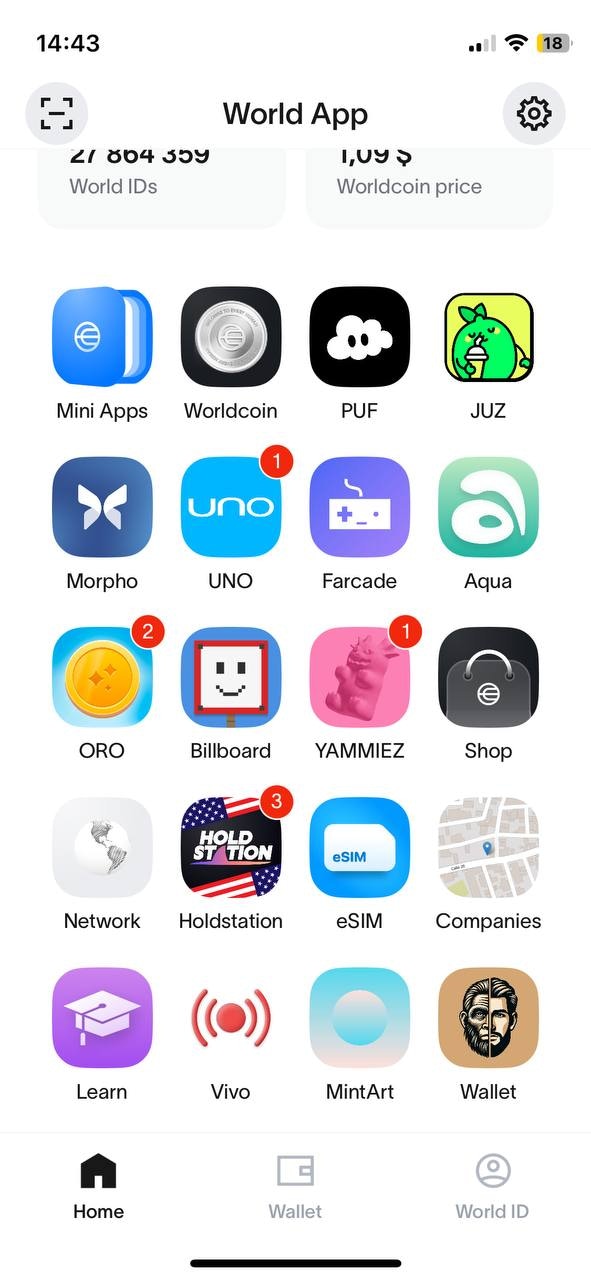
    ## Notification Badges

    If a user has pending notifications for your miniapp, and you maintain
    a 7 day rolling average open rate of 15% or higher, we'll show a badge on the user's home screen,
    next to your miniapp's icon.

    It's cleared once the miniapp is opened.

    Notification badges increase your miniapp's visibility on the home screen, leading to higher user engagement and traffic.
  </div>

  <div className="flex justify-center">
    <img src="https://mintcdn.com/tfh/vNgKkjbn9HQ46Vw7/images/docs/mini-apps/notifications/notification-badges.jpg?fit=max&auto=format&n=vNgKkjbn9HQ46Vw7&q=85&s=439b5fab2474bd1cd8203ba41690ad11" alt="Notification Interface in the Developer Portal" className="m-auto block" width="300" data-path="images/docs/mini-apps/notifications/notification-badges.jpg" />
  </div>
</div>

## Open Rate Goal

An excellent goal to aim for is a 25% open rate. This % means your notifications drive strong traffic to the miniapp.
You can see this stat in your dashboard in Developer Portal.

## Use Emoji & Curiosity in Titles

Increases visual salience and emotion.\
Examples:\
`🔥 You're missing out on rewards`\
`🕹️ A new level just unlocked`\
`🤔 What's waiting inside the vault today?`

## Useful links

* [How To Send Notifications](/mini-apps/commands/how-to-send-notifications)
* [How To Request Notification Permissions](/mini-apps/commands/request-permission)
* [How To Get Notification Permissions](/mini-apps/commands/get-permissions)
* [Send Notification API Reference](/api-reference/developer-portal/send-notification)