> ## Documentation Index
> Fetch the complete documentation index at: https://docs.world.org/llms.txt
> Use this file to discover all available pages before exploring further.
# Send Transaction
> Send one or more World Chain transactions using the unified MiniKit API.
**Breaking Changes in MiniKit v2**:
* SignatureTransfer is no longer supported. Please use Allowance Transfers documented below.
* Standard ERC-20 `approve()` calls now work in mini apps. Approval will be automatically revoked after the transaction.
## Permit2 Allowance Transfers (Recommended)
[Allowance transfers](https://docs.uniswap.org/contracts/permit2/reference/allowance-transfer#approve) are the recommended method for moving tokens in mini apps. World App automatically approves tokens to Permit2, so you can bundle the Permit2 approval and your contract call in a single `sendTransaction` for a better UX.
Expiration should always be set to 0 as the approval will be consumed in the same transaction.
Standard ERC-20 `approve()` also works if you prefer.
```tsx title="Frontend" theme={null}
import { MiniKit } from "@worldcoin/minikit-js";
import { encodeFunctionData, parseEther } from "viem";
const PERMIT2 = "0x000000000022D473030F116dDEE9F6B43aC78BA3";
async function approveAndSwap(
token: `0x${string}`,
spender: `0x${string}`,
amount: bigint,
) {
const result = await MiniKit.sendTransaction({
chainId: 480,
transactions: [
// 1. Approve spender via Permit2
{
to: PERMIT2,
data: encodeFunctionData({
abi: [
{
name: "approve", // You must use this method of Allowance Transfers
type: "function",
inputs: [
{ name: "token", type: "address" },
{ name: "spender", type: "address" },
{ name: "amount", type: "uint160" },
{ name: "expiration", type: "uint48" },
],
outputs: [],
stateMutability: "nonpayable",
},
],
functionName: "approve",
args: [
token,
spender,
amount,
// Always set deadline to 0 as it will be consumed in the same transaction
0,
],
}),
},
// 2. Call your contract (which pulls tokens via permit2.transferFrom)
{
to: spender,
data: encodeFunctionData({
abi: [
{
name: "swap",
type: "function",
inputs: [{ name: "amount", type: "uint256" }],
outputs: [],
stateMutability: "nonpayable",
},
],
functionName: "swap",
args: [amount],
}),
},
],
});
console.log(result.data.userOpHash);
}
```
```solidity title="Contract" theme={null}
// SPDX-License-Identifier: MIT
pragma solidity ^0.8.20;
import {IERC20} from "@openzeppelin/contracts/token/ERC20/IERC20.sol";
import {IAllowanceTransfer} from "permit2/src/interfaces/IAllowanceTransfer.sol";
contract Swap {
IERC20 public tokenA;
IERC20 public tokenB;
IAllowanceTransfer public immutable permit2;
constructor(address _tokenA, address _tokenB, address _permit2) {
tokenA = IERC20(_tokenA);
tokenB = IERC20(_tokenB);
permit2 = IAllowanceTransfer(_permit2);
}
function swap(uint256 amount) external {
// Pull tokenA from caller via Permit2 AllowanceTransfer
permit2.transferFrom(
msg.sender,
address(this),
uint160(amount),
address(tokenA)
);
// Send tokenB to caller
tokenB.transfer(msg.sender, amount);
}
}
```
World App automatically approves new ERC-20 tokens to the Permit2 contract.
Your contract only needs to call `permit2.transferFrom` — the token-level
approval is already in place.
## Result
```ts title="Type" theme={null}
type SendTransactionResponse =
| {
executedWith: "minikit" | "wagmi";
data: {
userOpHash: string;
status: "success";
version: number;
from: string;
timestamp: string;
};
}
| {
executedWith: "fallback";
data: unknown;
};
```
```json title="Example" theme={null}
{
"executedWith": "minikit",
"data": {
"userOpHash": "0x8004b63530b968a2a2c9ff414e01fc06a3ec5e4068d36d923df6aa4334744369",
"status": "success",
"version": 2,
"from": "0x1234567890123456789012345678901234567890",
"timestamp": "2026-03-28T18:24:00.000Z"
}
}
```
If you are integrating through Wagmi, viem, or ethers with the World App
EIP-1193 provider, the standard `eth_sendTransaction` call resolves to the
MiniKit `userOpHash`, not a canonical transaction hash. Do not treat the
returned value as a final transaction hash or pass it directly to
`waitForTransactionReceipt`. If you need the final on-chain transaction hash,
resolve the user operation status first.
## Confirming the User Operation
The command resolves as soon as the user operation is
submitted, so the first identifier you receive is `userOpHash`.
You can either use the `@worldcoin/minikit-react` hook or poll the Developer Portal
to check when the user operation is mined and get the final `transaction_hash`.
```tsx title="React" theme={null}
import { useUserOperationReceipt } from "@worldcoin/minikit-react";
import { createPublicClient, http } from "viem";
import { worldchain } from "viem/chains";
const client = createPublicClient({
chain: worldchain,
transport: http("https://worldchain-mainnet.g.alchemy.com/public"),
});
const { poll, isLoading, reset } = useUserOperationReceipt({ client });
const onClick = async () => {
const result = await MiniKit.sendTransaction({...});
const { receipt } = await poll(result.data.userOpHash);
// receipt contains the final transaction receipt
};
```
```ts title="API" theme={null}
type UserOperationStatusSuccess = {
status: "success";
userOpHash: string;
sender: string;
transaction_hash: string;
nonce: string;
};
const response = await fetch(
`https://developer.world.org/api/v2/minikit/userop/${userOpHash}`,
);
const status = await response.json();
if (status.status === "success") {
const success = status as UserOperationStatusSuccess;
console.log(success.transaction_hash);
}
```
See [GET /api/v2/minikit/userop/{user_op_hash}](/api-reference/developer-portal/get-user-operation)
for the full endpoint response shape.
## Error Codes
| Code | Meaning |
| ----------------------------------- | ---------------------------------------- |
| `invalid_operation` | The requested operation is not allowed |
| `user_rejected` | The user rejected the request |
| `input_error` | The payload is invalid |
| `simulation_failed` | Simulation failed before execution |
| `transaction_failed` | The transaction failed after submission |
| `generic_error` | Unexpected failure |
| `disallowed_operation` | The requested operation is disallowed |
| `validation_error` | Validation failed before execution |
| `invalid_contract` | The contract is not allowed for your app |
| `malicious_operation` | The operation was flagged as malicious |
| `daily_tx_limit_reached` | Daily transaction limit reached |
| `permitted_amount_exceeds_slippage` | Permit2 amount exceeds allowed slippage |
| `permitted_amount_not_found` | Permit2 amount could not be resolved |
## Fallback Behavior
By default we intend for mini apps to be useable outside of World App. Fallbacks generally will not be needed for this command and you should instead follow the [migration path outlined](/mini-apps/migration/minikit-v2).
## Allowlisting Contracts and Tokens
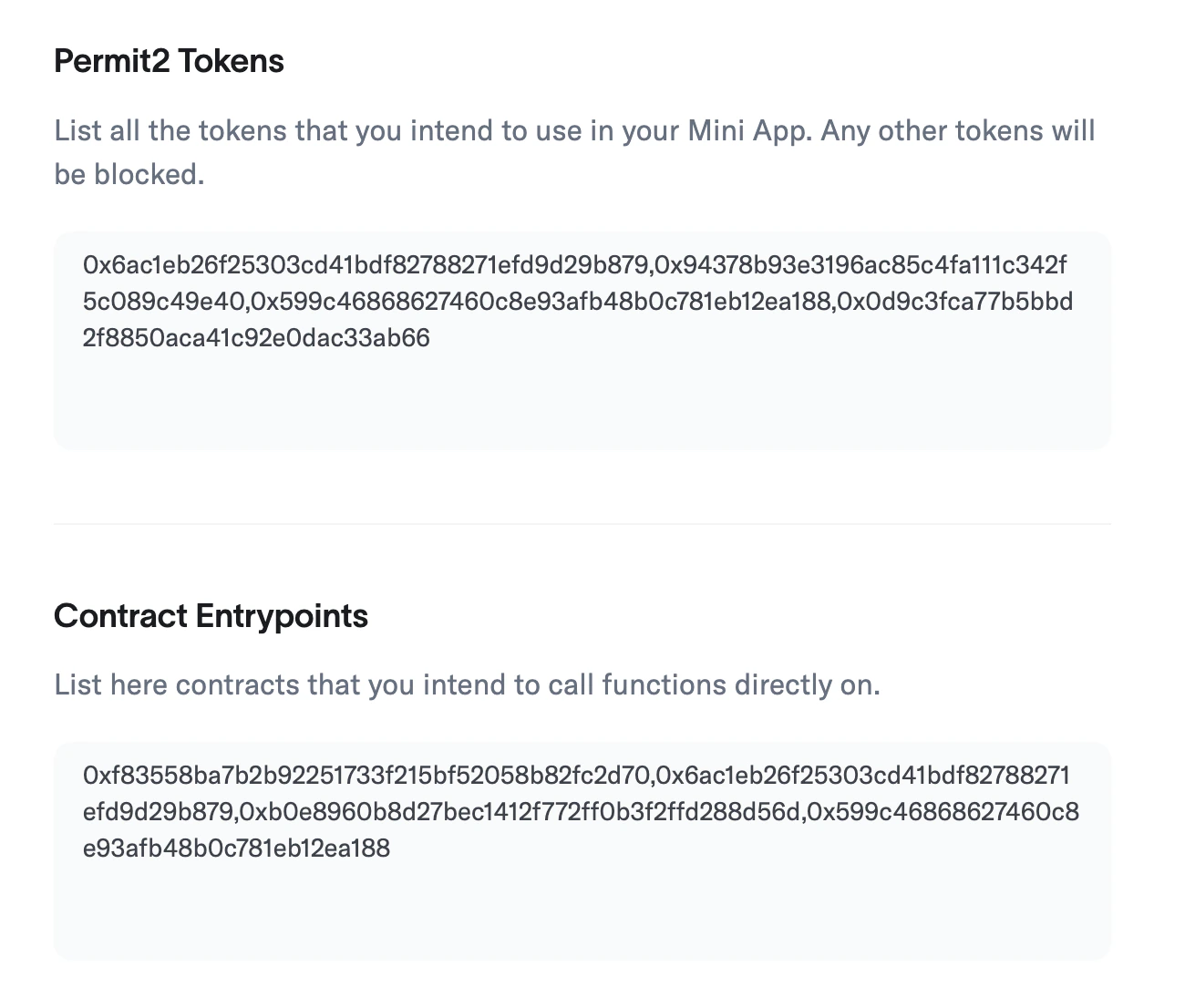
Before your mini app can send transactions, you must allowlist the contracts and tokens it interacts with. Navigate to **Developer Portal > Mini App > Permissions** and add:
* **Permit2 Tokens** — every ERC-20 token your app transfers via Permit2
* **Contract Entrypoints** — every contract your app calls directly
Developer Portal Whitelist
Transactions that touch non-whitelisted contracts or tokens will be blocked by
the backend with an `invalid_contract` error.
## Preview